Genstar4 Electronic Dispatch and Logging (EDL)
The Electronic Dispatch and Logging (EDL) module interfaces to the NESO
Balancing Mechanism for the exchange of information in near-to real-time as stipulated in the Grid Code.
The EDL module manages communication with the NESO EDL messaging interface that
is installed at each station, site, control point or Enegen Enterprise
Private Cloud (EPC) hosted EDL environment or to the NESO Wider Access API end
points.
This module provides access to the NESO messaging system, so it allows
operators to submit operational dynamic parameters for generation assets to NESO to receive dispatch instructions for Bid-Offer Acceptances and Ancillary
Services. This enables operators to respond to instructions to change output levels in real-time.
The EDL module supports the following activities:
- Sending changes in operational plant dynamic data to NESO including:
- Submission of multiple MEL following a delayed start.
- Delayed / scheduled submission of pre-planned non-time varying submissions.
- EDL library submission sets for time-varying (e.g. MEL) and non-time varying (e.g. ramp rates) submissions.
- Automated acceptance of Bid and Offer Acceptances (BOAs) within specific tolerances.
- Automatic calculation and submission of ETR and Remit notifications to MODIS.
- Receiving BOAs from NESO.
- Receiving Ancillary Service Instructions from NESO.
- Maintaining Logs of Submissions, BOAs and Ancillary Instructions.
- Submission of the revised MEL and MIL following the receipt of a BOA for battery assets (in accordance with NESO rules).
- Support for the Maximum Delivery Offer (MDO) and Maximum Delivery Bid (MDB) submissions required for Limited Duration Assets (LDAs)
Genstar4 provides APIs to automate communication (submissions and instructions) with external systems (e.g. ATOM or a plant control system).
EDL Communication with NESO
The EDL module supports the user at their Control Centre for accepting NESO instructions for Balancing and Ancillary Service dispatch, and for creating operational data submissions. EDL can support fully automated operations.
The following functionality is provided:
- A visual indicator shows the connection status between the Control Centre and NESO.
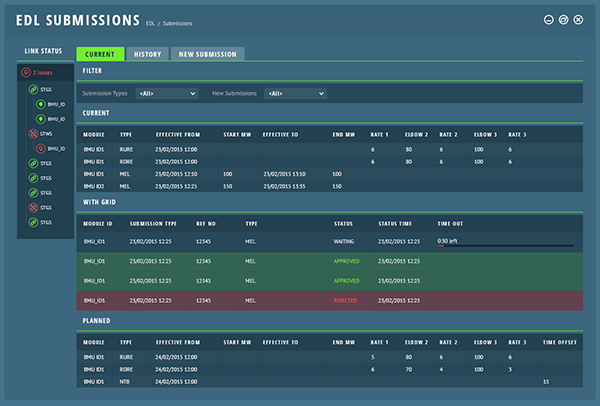
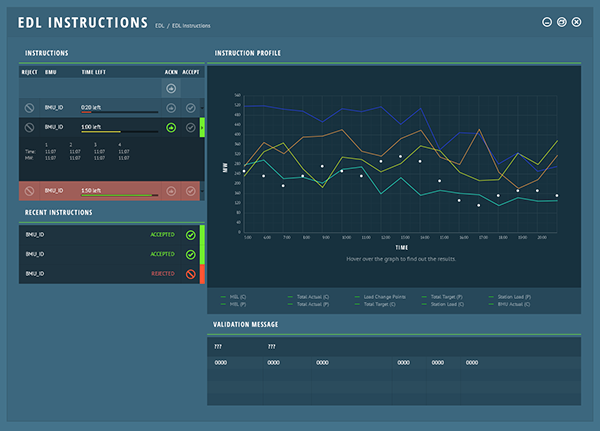
- An Instruction display screen shows the most recent history of Balancing and Ancillary Service Instructions.
- A prioritized display of a ‘New Instruction’ alert window displays the Instruction details whenever a new Instruction is received.
- If connection with NESO is lost, the Instruction screen allows the user to capture telephoned instructions through input dialogues.
- If there is a change to the value of a BM Unit operational parameter, the user at the Control Centre can submit the new value immediately to NESO.
- A Submission display screen shows the recent history of operational plant data
notified to NESO, including the current value of each submission data type.
The submission data types are:
- Maximum Export or Import Limit
- Stable (Minimum) Export/Import Limit
- Minimum On and Off Times
- Notice to Deviate from Zero (Start)
- Notice to Deliver Bids/Offers
- Run Up and Run Down Rates for Import/Export
Control Room Automation
Genstar4 provides powerful flexibility to enable asset operators and VLPs to automate
their operations.
A number of options are provided for the automation of BOA instruction acceptances,
namely:
- Continuous BOAs – if the BOA is a continuation of a previously accepted Instruction, accept automatically.
- Accept the BOA if it passes validation (e.g. starts and finishes on PN or within tolerance of PN).
- If the BOA is between MEL and SEL boundaries, accept the Instruction.
- Accept the Instruction in all cases.
In addition, the process of validation and acceptance when Genstar4 is integrated via APIs with a plant control system also has a number of options:
- Validate the BOA in Genstar4 and accept/reject accordingly; communicate an accepted Instruction to the control system.
- Upon receipt, communicate Instruction to the control system for validation. Await confirmation message from plant control system before sending acceptance/rejection to NESO.
- Accept the BOA regardless of validation and send the Instruction to the control system immediately.
Control Room Configuration
NESO provides two mechanisms for communication - either fixed line MPLS
circuits or APIs (Wider Access).
The Wider Access APIs may be used if a single site is less than 100MW capacity or a
participants’ portfolio is less than 300MW. Above these thresholds fixed EDT and EDL
circuits must be installed.
For participants exceeding the Wider Access thresholds, Grid Code requires that each
asset has a designated control point, at which NESO will commission a network
line and router, and supply an EDL communication protocol stack (“CTC message client”)
for installation on a PC which requires a dedicated network card for the EDL link.
Enegen can provide a hosted solution including EDT and EDL circuits which
dramatically reduced time to market considerations for participants.
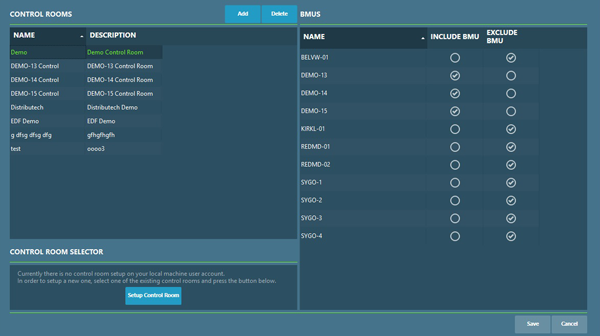
The EDL module manages fully flexible arrangements of BM Units into multiple
control-desk configurations, which may be designated as active (controlling) or passive
(display only).
Genstar4 also provides full support for dispatching power stations via
EDT.
To learn more about power station dispatch in the UK visit the EDL and EDT pages or Contact Enegen for a product demonstration of
Genstar4.
Click here to request a call back or telephone +44 (0)23 9431 7620
Contact us for support at any level
Telephone: +44 (0)23 9431 7620
Email: info@enegen.co.uk